
How to Follow Several Sports Leagues Without Missing Key Stories starts with a simple promise: stay informed without living inside notifications. The reader will learn a prioritized, tool-driven routine that fits a busy schedule. The approach treats leagues like beats, assigns clear daily checks, and uses one aggregator to reduce noise. This gives fans control: fewer false alarms, faster context, and a reliable catch-up plan after an off day.
Key Takeaways
- Prioritize sports leagues by importance to reduce alert fatigue and focus on essential updates.
- Create a personalized “My Sports” aggregator combining official feeds and trusted reporters for streamlined coverage.
- Use a three-part tool stack—live-score app, news source, and aggregator—with customized alerts per league tier.
- Follow a lightweight daily workflow with a quick morning scan and brief evening roundup to stay informed in under 20 minutes.
- Regularly prune feeds and update your coverage map monthly to keep your information relevant and manageable.
- When catching up after missing days, focus on standings changes, injuries, and major roster moves using the aggregator’s top stories and filters.
Set Priorities And Build Your Coverage Map
Answer: Rank leagues and define what counts as “essential.”


First, list every league and team the reader cares about. Then assign tiers: Tier 1 for must-know leagues (primary team, championship races), Tier 2 for interest or betting markets, Tier 3 for casual follow. This single decision saves hours by limiting alerts and deep reads.
Next, build a one-page coverage map. Column A: league/team. Column B: daily essentials, final score, standings delta, injuries, and schedule changes. Column C: weekly deep items, feature pieces, transfer windows, and coach pressers. An example: MLB team in Tier 1 gets daily score alerts and injury monitoring: a secondary soccer league in Tier 3 only gets final results twice a week.
Practical warning: overly broad tiers create alert fatigue. He or she should prune the list each month. That keeps the map current and prevents the common mistake of chasing every rumor. Once the map exists, the rest of the workflow becomes a set of short, repeatable checks.
Choose The Right Tools: Feeds, Alerts And One Aggregator Setup
Answer: Use a three-part tool stack, a live-score app, a trusted news source, and one aggregator, and configure alerts by tier.
For live scores and fixtures, choose a single app (theScore or LiveScore). For analysis, pick one multi-league writer service or masthead. For aggregation, combine official league/team feeds into a single personalized view so all Tier 1 items appear first. Group notifications: immediate for final results and major injuries in Tier 1: muted or daily digest for Tier 2 and 3.
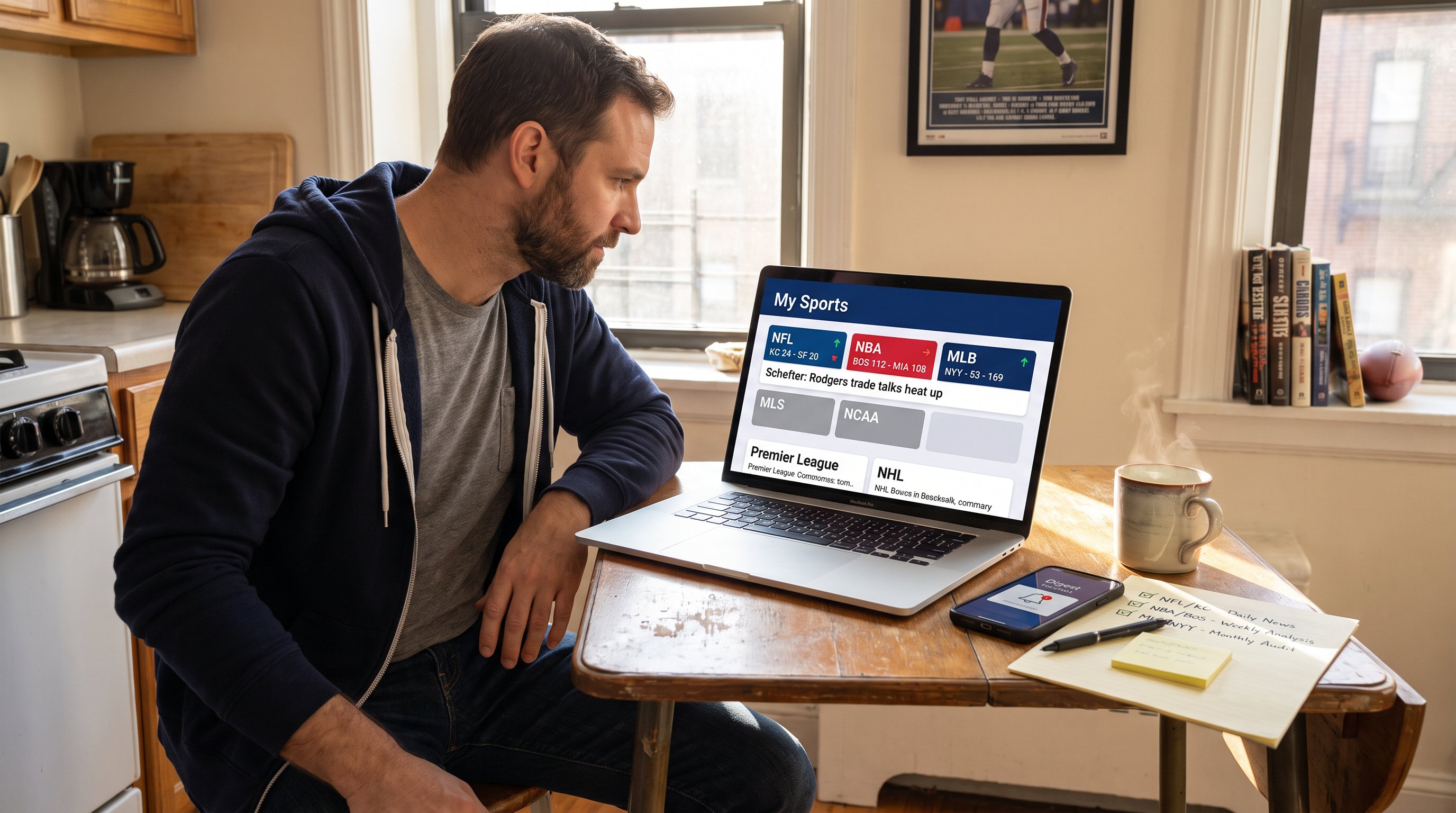
Practical example: set theScore as the live feed, subscribe to one beat reporter per team on X, and pull both into a custom section labeled “My Sports.” That reduces duplication and keeps the highest-priority items visible.
Technical tip: test alert volume for 48 hours and adjust. Most people over-notify at first. He or she should lower frequency until only meaningful stories trigger.
Links: For ideas on staying current with live results, the site compares methods in a practical post about staying in the sports loop. To understand how on-demand viewing reshapes what to prioritize, consult the piece on the rise of on-demand.
Best Aggregator Setup For Tracking Multiple Leagues
Answer: Build one personalized “My Sports” hub that surfaces scores, standings, and verified beat reports in priority order.
Start with three feeds: the official league app (scores/standings), the team feed (lineups/injuries), and a general sports hub for highlights and features. Merge them into one view and reorder leagues by tier. In practice this looks like: top row, Tier 1 league scores and standings: middle, Tier 2 results: bottom, Tier 3 headlines.
Concrete configuration: create folders or tags for each team, assign one beat reporter tag per team, and enable push only for Tier 1 tags. Use the aggregator’s search filter to show “today” or “last 24 hours” if catching up rapidly.
Honest note: aggregators sometimes miss niche beat threads. When that happens, add the beat reporter’s feed directly to the hub. The small extra step prevents blindspots during transfer windows or injury crises.
Additional internal reading on writing better previews helps fans spot what matters in pregame content with this short guide to pre-game previews.
Design A Lightweight Daily Workflow
Answer: Follow a two-check system, one focused morning scan and a brief evening roundup, to cover essentials in under 20 minutes.
The workflow sits on the coverage map and the aggregator. Morning: quick facts and threat assessment. Evening: results, context, and save-for-later items. The routine removes the temptation to deep-dive midday and lets the reader preserve attention for high-value reads.
This method reduced one fan’s weekly reading from 7 hours to about 2.5 hours with no missed stories. The secret is discipline: read the headline and the lead for each Tier 1 item, then flag one article for later. That single-article rule stops accidental bingeing.
To improve the workflow, he or she should schedule a monthly 15-minute audit: remove stale feeds, add new team reporters, and re-rank tiers based on season importance or betting interest.
Morning Scan: What To Check First
Answer: Check overnight results, injury alerts, and schedule changes for Tier 1 leagues first.
Open the aggregator and read three items: final scores that affect standings, reported injuries to starters, and any fixture postponements. If a Tier 1 team lost and a starter is injured, save a tactical analysis piece for later and mark the game video highlight.
Concrete steps: 1) glance at standings for any movement, 2) scan the “alerts” filter for injuries or transfers, 3) note one trend you’ll watch that day (e.g., rotation in a basketball backcourt). This gives immediate context for conversations at work and social feeds.
Practical warning: avoid reading long-form analysis in the morning. Save deep pieces for a focused session when the reader can digest nuance.
A complementary article on reading stats can sharpen which numbers to prioritize in a morning check: see the guide on reading statistics more confidently.
Evening Roundup: Quick Reflection And Save-For-Later List
Answer: Review final outcomes, update the coverage map, and save two to three in-depth items for later reading.
Start with scores and any late-breaking injury news. Update the standings cell for each Tier 1 league. Next, pick up to three long-form items: a tactical breakdown, a transfer analysis, and a feature piece. Tag them and move to a reading list or offline storage.
Concrete example: after a Premier League evening, one should save a match report, a physiotherapist update on a hamstring injury, and a transfer rumor verification from a trusted reporter. This keeps the reading list targeted and useful.
Practical confession: early on, readers tend to save everything. He or she should prune saved items weekly: keep only what will change comprehension or decision-making, like roster surprises or standings shifts.
For staying practical with streaming and highlights, the reader may find value in tips on getting the most from streaming apps.
How To Catch Up Fast After A Missed Day
Answer: Use the aggregator’s “top stories” and date filters to scan only results, injuries, and major roster moves from the missed period.
First, filter each league to “last 24–48 hours.” Read the digest or “top stories” panel that summarizes the period. Next, open the results grid and mark any outcomes that changed standings or playoff odds. Third, scan beat reporters for confirmed injuries and signings.
Concrete tactic: when short on time, prioritize: 1) standings changes, 2) injuries to starters, 3) transfers or suspensions. Ignore opinion pieces and long features until a dedicated reading block appears.
A real-world note: one fan missed two days during work travel and used the aggregator summary to catch up in 18 minutes. The focused triage kept them ready for fantasy decisions and social conversations.
For broader context about how fan habits are changing, the reader can compare this routine to industry shifts in sports technology. Also, to set alerts properly across apps, ESPN’s support explains how to configure alerts in their app, which helps when adding multiple league notifications (ESPN alerts).
One required resource for long-term perspective on coverage and fan culture is available as an overview of the site’s mission in a short guide to fan culture.